
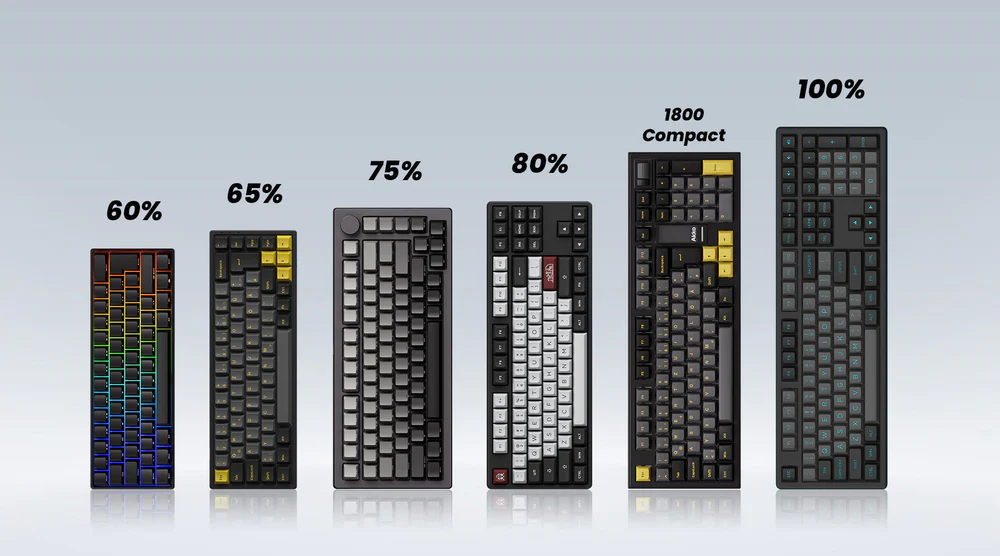
Mechanical keyboards come in five main sizes: Full-Size (104 keys) with numpad and all function keys, Tenkeyless/TKL (87 keys) without numpad, 75% (84 keys) with compressed layout, 65% (68 keys) without function row but with arrow keys, and 60% (61 keys) with only alphanumeric keys. Full-size keyboards are best for data entry and office work, TKL for gaming and general use, 75% for developers who need F-keys in compact form, 65% for balanced functionality and aesthetics, and 60% for maximum desk space and portability.
- Full-Size (104 keys) keyboards offer complete functionality with numpad, function row, and navigation - ideal for data entry and office work
- Tenkeyless/TKL (87 keys) removes the numpad while maintaining F-keys and arrows, making it great for gaming and improved ergonomics
- 75% layouts (84 keys) feature a compressed design with F-keys, perfect for developers needing function keys in a smaller footprint
- 65% keyboards (68 keys) eliminate the function row but keep arrow keys, offering a good balance between size and functionality
- 60% boards (61 keys) include only alphanumeric keys with all other functions on layers, maximizing desk space and portability
Quick Summary
Full-Size (104-key): Traditional layout with complete numpad, function row, and navigation cluster. Best for accounting, data entry, and users who want zero compromises on functionality.
Tenkeyless/TKL (87-key): Removes numpad while keeping F-keys and arrow keys. Ideal for gaming, office work, and better ergonomics without major layout changes.
75% (84-key): Compressed layout that keeps F-keys but eliminates gaps between sections. Perfect for developers and users who need F-keys in minimal space.
65% (68-key): Eliminates function row but retains arrow keys and some navigation keys. Excellent balance of compactness and functionality for enthusiasts and small desk setups.
60% (61-key): Only alphanumeric keys with everything else on function layers. Maximum portability and desk space, popular among enthusiasts and customization lovers.
This comprehensive guide covers everything you need to know about mechanical keyboard sizes, from detailed specifications and use cases to function layers and choosing the right layout for your specific needs.
Understanding Keyboard Anatomy
Before diving into specific keyboard sizes, it’s essential to understand the basic anatomy of a keyboard and how different sections contribute to overall functionality.
Key Sections of a Standard Keyboard
Alphanumeric Section: Contains letters, numbers (1-0), and basic punctuation. This section remains largely unchanged across all keyboard sizes and forms the core of every layout.
Function Row: The top row of keys (F1-F12) provides shortcuts for system functions, media controls, and application-specific commands. Compact keyboards often integrate these functions into other keys using layers.
Navigation Cluster: Includes arrow keys, Page Up/Down, Home, End, Insert, and Delete keys. Essential for text editing and document navigation, though compact layouts may relocate these functions.
Numpad: The numeric keypad on the right side of full-size keyboards. Provides efficient number entry for data input, accounting, and calculations. This is typically the first section eliminated in smaller layouts.
Modifier Keys: Control, Alt, Shift, and Windows keys that modify other key functions. The arrangement and number of modifier keys can vary significantly between keyboard sizes.
Understanding these sections helps explain why certain keyboard sizes excel in specific use cases and how manufacturers maintain functionality while reducing physical footprint.
Standard Keyboard Sizes Explained
The mechanical keyboard community has standardized around several common sizes, each offering distinct advantages and trade-offs. Here’s a detailed breakdown of the most popular layouts.
Full-Size Keyboards (104-key layout)
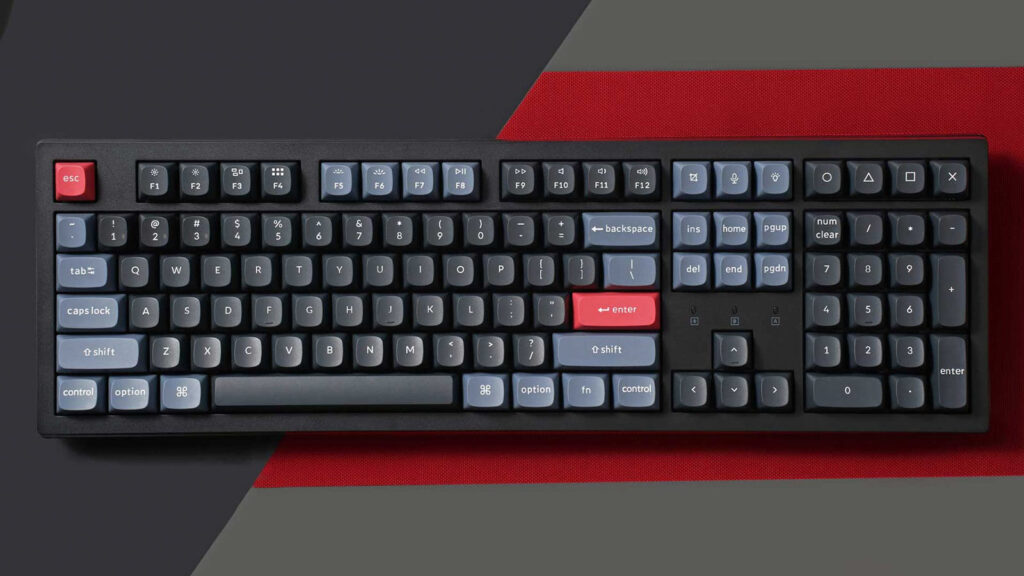
Full-size keyboards represent the traditional desktop keyboard layout that most users are familiar with from office environments and pre-built computers.
Key Count: 104 keys (US ANSI layout) Dimensions: Approximately 17.5″ x 6.5″ (444mm x 165mm) Notable Features: Complete numpad, full function row, dedicated navigation cluster
Advantages:
- Complete functionality: Every key you might need is present and accessible without function layers
- Familiar layout: No learning curve for users transitioning from standard keyboards
- Excellent for data entry: Dedicated numpad significantly speeds up numeric input
- Professional compatibility: Matches most office keyboard expectations
- No compromise on shortcuts: All function keys and system shortcuts readily available
Disadvantages:
- Large desk footprint: Requires significant desk space and may push mouse to uncomfortable distance
- Limited portability: Too large for most laptop bags or portable setups
- Ergonomic concerns: Wide layout may contribute to shoulder strain from extended mouse reach
- Fewer aesthetic options: Less popular in enthusiast community, limiting custom keycap and case choices
Best For: Accountants, data analysts, users with large desk setups, those who frequently use numeric input, and anyone who prefers no compromises in functionality.
Tenkeyless (TKL) Keyboards (87-key layout)
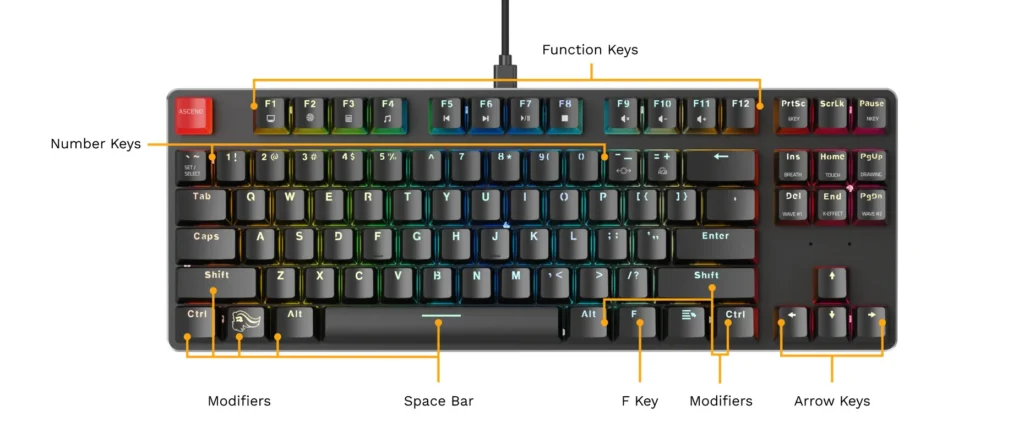
Tenkeyless keyboards remove the numpad while retaining the function row and navigation cluster, creating a more compact layout without sacrificing core functionality.
Key Count: 87 keys (US ANSI layout) Dimensions: Approximately 14″ x 6.5″ (356mm x 165mm) Notable Features: Retains F1-F12 keys, dedicated arrow keys, and navigation cluster
Advantages:
- Better ergonomics: Brings mouse closer to centerline, reducing shoulder strain
- Desk space efficiency: Significantly smaller footprint while maintaining most functionality
- Gaming optimization: More space for low-sensitivity mouse movements
- Professional appearance: Maintains familiar layout for office environments
- Good portability: Fits in most messenger bags and backpacks
Disadvantages:
- No dedicated numpad: Numeric entry requires using number row or external numpad
- Still relatively large: Not as compact as 75% or smaller layouts
- Function key spacing: Some users find the gap between F-key clusters unnecessary
Best For: Gamers, general office workers, programmers who don’t heavily use numpads, and users seeking better ergonomics without major layout changes.
75% Keyboards (84-key layout)
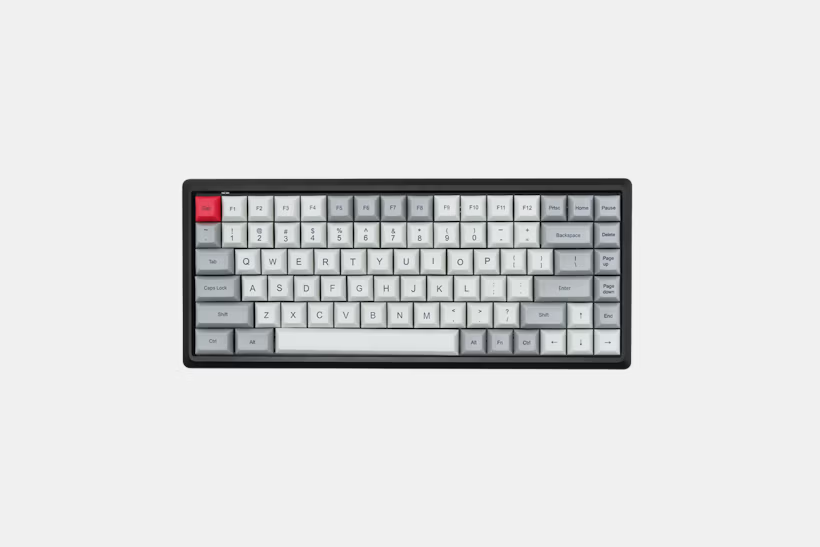
75% keyboards compress the TKL layout by removing gaps and spacing between key sections, creating a more compact form factor while retaining nearly all functionality.
Key Count: 82-84 keys (varies by manufacturer) Dimensions: Approximately 12.5″ x 5″ (318mm x 127mm) Notable Features: F-keys retained, compact navigation cluster, no wasted space
Advantages:
- Maximum efficiency: Retains F-keys and most navigation keys in minimal space
- Unique aesthetic: Distinctive compressed look appeals to enthusiasts
- Good functionality: Minimal compromise on key availability
- Portable size: Much easier to transport than TKL or full-size
- Gaming friendly: Compact enough for optimal mouse positioning
Disadvantages:
- Cramped layout: Reduced spacing between key sections can cause accidental presses
- Limited availability: Fewer options compared to other standard sizes
- Adaptation period: Unusual key positioning may require adjustment time
- Navigation cluster: Arrow keys and home cluster may feel cramped
Best For: Users who need F-keys but want maximum compactness, developers who use function keys for IDE shortcuts, and enthusiasts who appreciate unique layouts.
65% Keyboards (68-key layout)
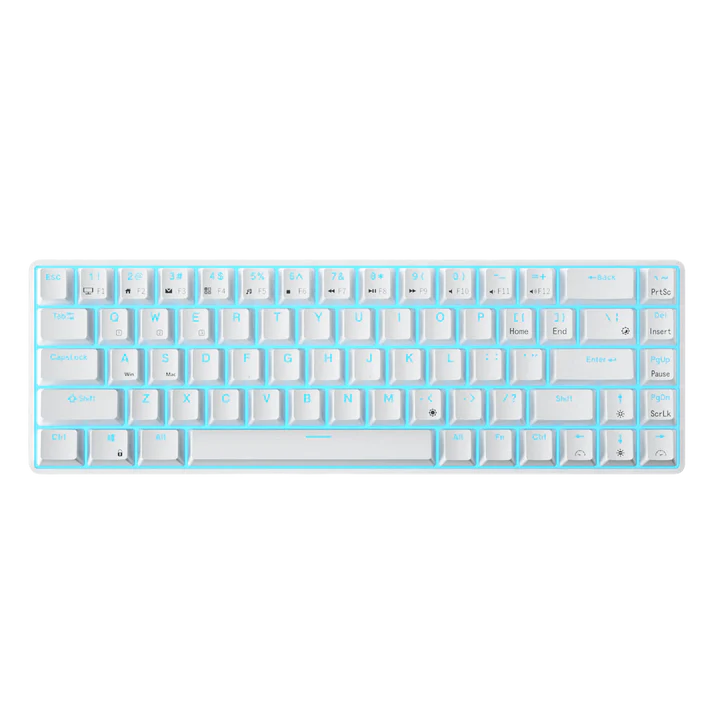
65% keyboards eliminate the function row while retaining arrow keys and some navigation keys, offering an excellent balance between compactness and functionality.
Key Count: 67-68 keys (varies by layout) Dimensions: Approximately 12″ x 4.5″ (305mm x 114mm) Notable Features: Dedicated arrow keys, compact navigation cluster, function layer for F-keys
Advantages:
- Optimal size balance: Compact enough for small desks while retaining essential keys
- Arrow key retention: Maintains dedicated directional keys for navigation
- Aesthetic appeal: Clean, minimalist appearance popular in enthusiast community
- Good portability: Easily fits in most bags while remaining practical
- Extensive customization: Wide variety of cases, keycaps, and switch options available
Disadvantages:
- No dedicated F-keys: Function row requires Fn layer, slowing access to shortcuts
- Limited navigation: Missing some home cluster keys (PgUp, PgDn, Home, End)
- Learning curve: Requires memorizing function layer combinations
- Professional limitations: May not meet expectations in some office environments
Best For: Enthusiasts seeking aesthetic appeal, users with limited desk space, gamers who rarely use F-keys, and those who appreciate minimalist designs.
60% Keyboards (61-key layout)
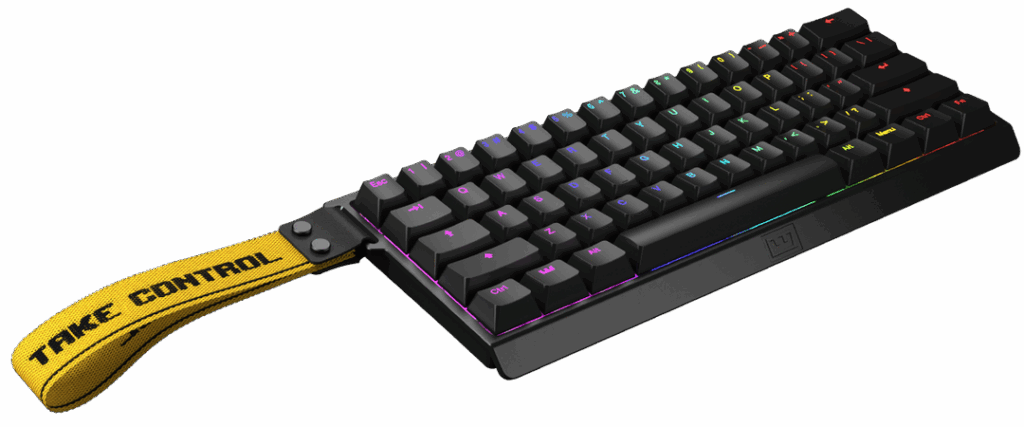
60% keyboards represent the most popular compact layout, removing both the function row and arrow keys while maintaining the core alphanumeric section.
Key Count: 61 keys (US ANSI layout) Dimensions: Approximately 11.5″ x 4.25″ (292mm x 108mm) Notable Features: Alphanumeric keys only, everything else on function layers
Advantages:
- Maximum desk space: Leaves abundant room for mouse movement and other peripherals
- Symmetrical layout: Centers hands naturally on keyboard without offset
- Ultimate portability: Fits easily in laptop bags and small spaces
- Cost effective: Generally less expensive due to fewer switches and components
- Huge customization scene: Most popular size for custom builds and modifications
Disadvantages:
- Steep learning curve: Requires memorizing multiple function layer combinations
- No dedicated arrows: Navigation requires Fn combinations or separate arrow layer
- Productivity impact: Slower access to commonly used keys may reduce efficiency
- Professional limitations: May not be acceptable in many workplace environments
- Gaming considerations: Some games may be difficult without easily accessible function keys
Best For: Enthusiasts who prioritize aesthetics and customization, users with very limited desk space, touch typists comfortable with function layers, and those who rarely use navigation keys.
Ultra-Compact and Specialty Layouts
Beyond the standard sizes, several specialty layouts cater to specific use cases or push the boundaries of compactness even further.
40% Keyboards
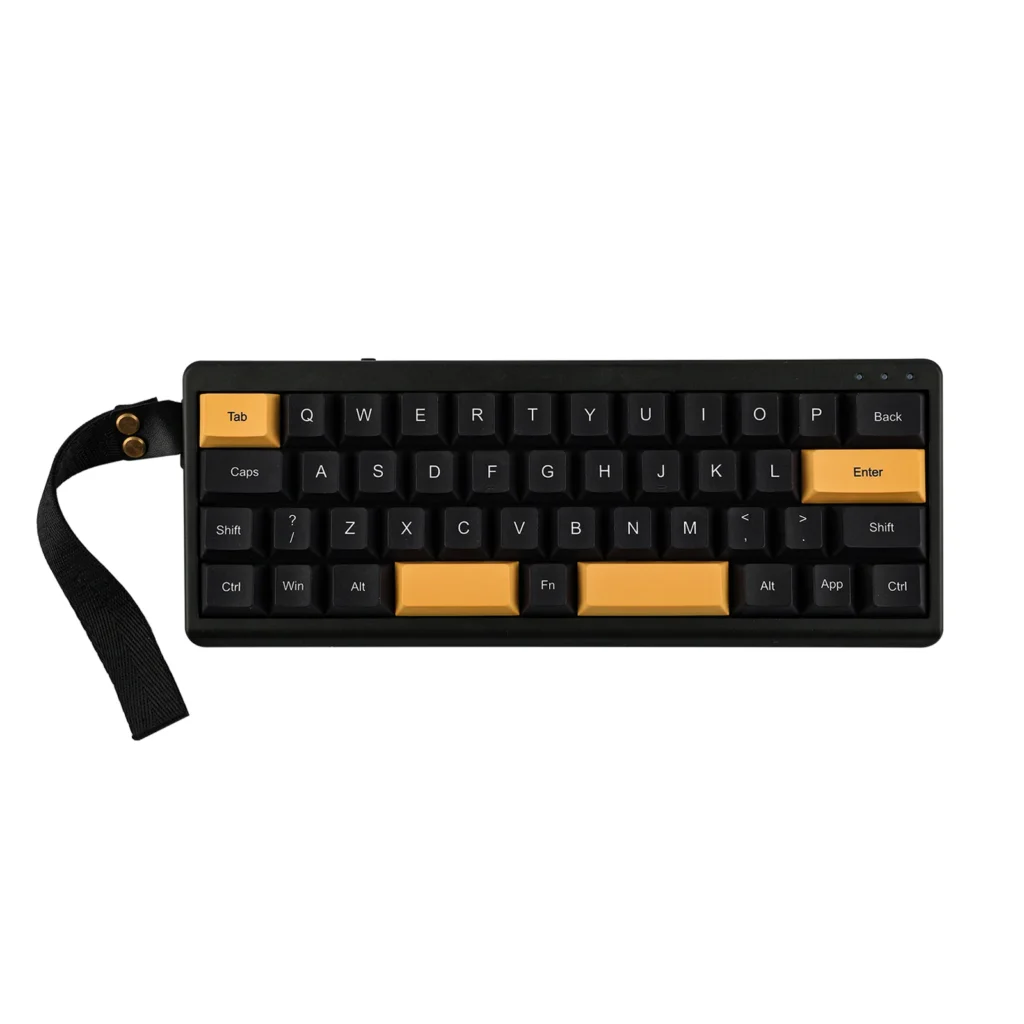
40% keyboards push minimalism to the extreme, typically featuring only 47-48 keys arranged in a grid format without number row.
Key Features:
- Only letter keys, space, and essential modifiers
- Numbers accessed through function layer
- Extreme portability and unique aesthetic
- Requires significant adaptation and memorization
Best For: Enthusiasts seeking ultimate minimalism, writers who primarily use letters, and users who enjoy the challenge of optimized layouts.
Split Keyboards
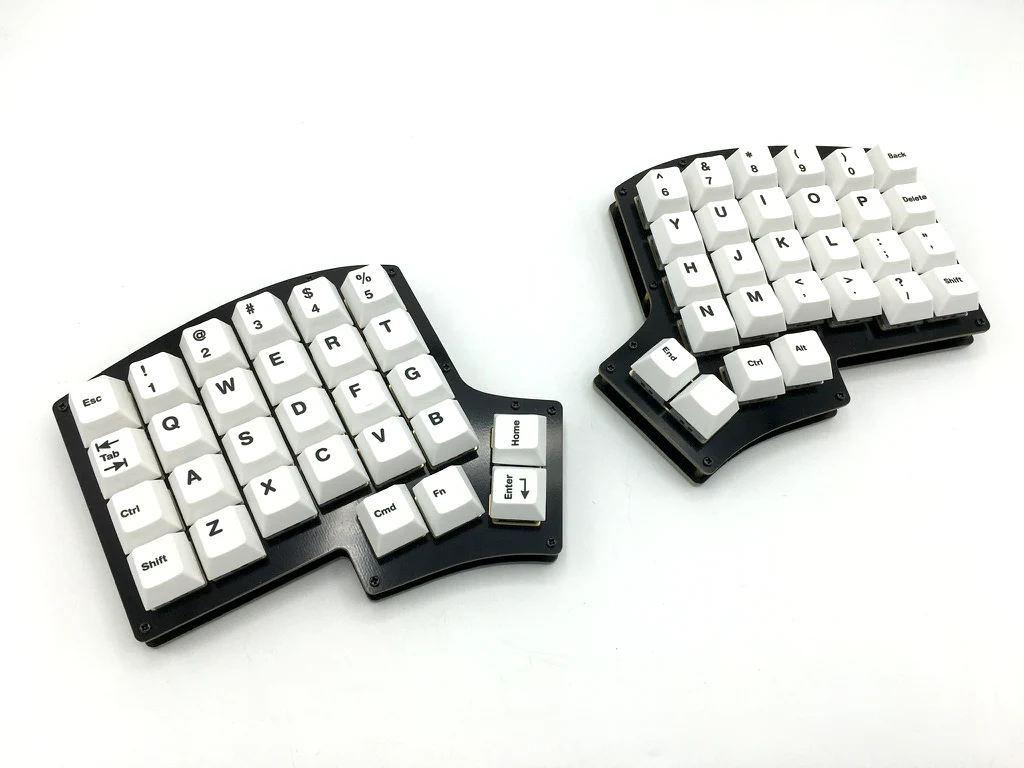
Split keyboards divide the layout into two separate halves, allowing for more natural hand positioning and reduced wrist strain.
Key Features:
- Two separate keyboard halves
- Customizable angle and separation
- Often features non-traditional key arrangements
- Focus on ergonomic benefits over compactness
Best For: Users with wrist or shoulder pain, those who type for extended periods, and ergonomic enthusiasts willing to invest time in adaptation.
Ortholinear Layouts
Ortholinear keyboards arrange keys in a perfect grid pattern rather than the traditional staggered rows, theoretically improving typing efficiency.
Key Features:
- Keys arranged in straight columns and rows
- Reduced finger travel distance
- Available in various sizes (40%, 60%, etc.)
- Requires complete relearning of muscle memory
Best For: Touch typists interested in optimization, users willing to invest significant time in retraining, and those who appreciate mathematical precision in layout design.
Function Layers and Programming
Understanding how compact keyboards maintain functionality through function layers is crucial for making an informed size choice.
How Function Layers Work
Function layers allow a single key to perform multiple functions depending on which modifier keys are held. Most compact keyboards use the Fn key to access secondary functions.
Primary Layer: The default function of each key when pressed normally Function Layer: Alternative functions accessed by holding Fn key Additional Layers: Some keyboards offer multiple layers for extensive customization
Common Function Layer Mappings
F-Keys: Usually mapped to number row (Fn + 1 = F1, Fn + 2 = F2, etc.) Arrow Keys: Often mapped to WASD or IJKL keys with Fn modifier Home Cluster: Page Up/Down, Home, End typically assigned to various key combinations Media Controls: Volume, brightness, and playback controls frequently integrated
Programming and Customization
Many mechanical keyboards offer software or firmware customization, allowing users to:
- Reassign any key to any function
- Create custom macros and shortcuts
- Adjust function layer behavior
- Set up application-specific profiles
Popular firmware options include QMK and VIA, which provide extensive customization capabilities for compatible keyboards.
Choosing the Right Size for Your Needs
Selecting the optimal keyboard size depends on your specific use case, available space, and personal preferences. Here’s detailed guidance for common scenarios.
Best Layouts for Gaming
Competitive Gaming: 60% or 65% keyboards provide maximum mouse space for low-sensitivity gameplay while maintaining essential keys. The compact size allows for better ergonomic positioning and reduces the distance between keyboard and mouse.
MMO Gaming: Full-size or TKL keyboards offer more readily accessible keys for complex key bindings and macros. The numpad can serve as additional macro keys for MMO abilities and shortcuts.
Casual Gaming: 65% or 75% keyboards provide a good balance, offering enough functionality for most games while not overwhelming the setup with unnecessary keys.
Key Considerations:
- Mouse space requirements based on sensitivity preferences
- Game-specific key binding needs
- Desk size and ergonomic setup
- RGB lighting preferences (more keys = more lighting)
Best Layouts for Programming
Software Development: 75% keyboards often work best, providing essential F-keys for IDE shortcuts while maintaining compactness. Function keys are crucial for debugging, building, and IDE navigation.
Web Development: 65% keyboards can be sufficient, as web development typically requires fewer function key shortcuts. The balance of size and functionality suits most coding tasks.
Data Science/Analysis: Full-size keyboards excel due to heavy numpad usage for data entry and statistical calculations. The dedicated numeric section significantly improves productivity.
Key Considerations:
- IDE and tool-specific shortcut requirements
- Numeric input frequency
- Multiple monitor setup space constraints
- Collaboration and code review scenarios
Best Layouts for Office Work
General Office Tasks: TKL keyboards provide familiar functionality without the bulk of a full-size board. Most office software shortcuts remain easily accessible.
Accounting/Finance: Full-size keyboards are essential due to heavy numeric input requirements. The dedicated numpad is non-negotiable for efficient data entry.
Writing and Editing: 65% keyboards offer sufficient functionality for document creation while providing a cleaner, more focused workspace.
Key Considerations:
- Company equipment standards and expectations
- Specific software workflow requirements
- Desk sharing and hot-desking scenarios
- Professional appearance preferences
Space and Portability Considerations
Small Desk Setup: 60% or 65% keyboards maximize available desk space while maintaining core functionality. Essential for cramped dorm rooms or small home offices.
Frequent Travel: 60% keyboards offer the best portability while remaining practical for extended use. Fits easily in laptop bags alongside other equipment.
Standing Desk: Compact keyboards work well with adjustable standing desks, taking up less space on potentially smaller work surfaces.
Multi-Monitor Setup: Smaller keyboards prevent interference with monitor bezels and allow for better monitor positioning.
Layout Pros and Cons Comparison
| Layout | Pros | Cons | Best For |
|---|---|---|---|
| Full-Size | Complete functionality, familiar layout, excellent for data entry | Large footprint, poor ergonomics, limited portability | Accounting, data entry, traditional office work |
| TKL | Good balance, better ergonomics, maintains F-keys | Still relatively large, no numpad | Gaming, general office, programming |
| 75% | Maximum efficiency, unique aesthetic, retains F-keys | Cramped layout, limited availability | Developers, compact setups, enthusiasts |
| 65% | Great size balance, keeps arrows, highly customizable | No dedicated F-keys, learning curve | Enthusiasts, small desks, balanced usage |
| 60% | Maximum compactness, symmetrical, huge community | Steep learning curve, professional limitations | Enthusiasts, tiny desks, customization focus |
Functionality Matrix
| Feature | Full-Size | TKL | 75% | 65% | 60% |
|---|---|---|---|---|---|
| Dedicated F-Keys | ✅ | ✅ | ✅ | ❌ | ❌ |
| Arrow Keys | ✅ | ✅ | ✅ | ✅ | ❌ |
| Numpad | ✅ | ❌ | ❌ | ❌ | ❌ |
| Home Cluster | ✅ | ✅ | ✅ | Partial | ❌ |
| Compact Size | ❌ | ⚠️ | ✅ | ✅ | ✅ |
| Portability | ❌ | ⚠️ | ✅ | ✅ | ✅ |
Frequently Asked Questions
What’s the most popular keyboard size?
TKL (87-key) keyboards are generally the most popular among mainstream users due to their balance of functionality and size. However, in the enthusiast community, 60% and 65% layouts have gained significant popularity for their customization options and aesthetic appeal.
Can I use a 60% keyboard for work?
Yes, but it depends on your specific work requirements. 60% keyboards work well for general typing, programming, and creative work. However, they may not be suitable for jobs requiring heavy numeric input, frequent use of function keys, or environments with strict professional appearance standards.
How long does it take to adapt to a smaller keyboard?
Adaptation time varies by individual and size reduction. Moving from full-size to TKL typically requires minimal adjustment (1-2 days). Transitioning to 65% may take 1-2 weeks, while adapting to 60% keyboards often requires 2-4 weeks of regular use to become fully comfortable with function layers.
Are compact keyboards good for gaming?
Compact keyboards can be excellent for gaming, particularly for competitive players who need maximum mouse space. 60% and 65% keyboards are popular among esports professionals. However, some games with complex key bindings may benefit from larger layouts with more readily accessible keys.
What if I need a numpad sometimes?
Several solutions exist for occasional numpad users:
- External USB numpads that can be positioned as needed
- Keyboards with detachable numpads
- Function layer numpad (usually mapped to the right side of the keyboard)
- Left-hand numpads for better ergonomics
Can I try different sizes before buying?
Yes, several options exist:
- Keyboard testing stations at electronics stores
- Meetups and conventions often feature various layouts
- Online retailers with good return policies
- Borrowing from friends or colleagues
- Switch and key testers (though these don’t show full layouts)
Do all mechanical keyboards support custom layouts?
Not all keyboards support extensive customization. Look for keyboards with:
- QMK/VIA firmware support for maximum customization
- Software customization for basic reassignment
- Hotswap switches for easy switch changes
- Standard keycap sizes for custom keycap compatibility
What about wireless options in different sizes?
Wireless mechanical keyboards are available in all standard sizes, though selection may be more limited in compact sizes. Consider battery life implications – smaller keyboards typically offer longer battery life due to fewer switches and LEDs.
Related Resources
Essential Guides for New Enthusiasts
Switch Selection Guide: Understanding different switch types and characteristics is crucial for building your ideal keyboard, regardless of size.
Keycap Guide: Learn about different keycap profiles, materials, and compatibility considerations for various keyboard layouts.
Build Guide: Step-by-step instructions for assembling custom keyboards, with size-specific considerations and recommendations.
Advanced Topics
QMK Firmware Tutorial: Comprehensive guide to programming and customizing keyboard behavior using the popular QMK firmware.
Ergonomic Setup Guide: Proper positioning and workspace arrangement for different keyboard sizes to maximize comfort and reduce strain.
Switch Modification Guide: Advanced techniques for customizing switch feel and sound through lubing, filming, and spring swapping.
Community Resources
r/MechanicalKeyboards: The largest online community for mechanical keyboard enthusiasts, with daily discussions and showcase posts.
Keyboard Meetups: Local gatherings where you can test different keyboards and meet other enthusiasts in your area.
YouTube Channels: Video reviews and tutorials from respected community members and content creators.
Choosing the right keyboard size is a personal decision that depends on your specific needs, available space, and willingness to adapt to new layouts. Start by honestly evaluating your usage patterns and space constraints, then consider trying different sizes through friends, stores, or meetups before making your final decision.
Remember that there’s no universally “best” keyboard size – only the size that works best for your unique situation. Whether you choose the familiarity of a full-size layout or embrace the minimalism of a 60% keyboard, the most important factor is finding a layout that enhances rather than hinders your daily computing experience.
One Response