
If your keyboard is the car, then the switches under each key are the engine. They define how your keyboard feels, sounds, and performs—whether you’re writing a novel, climbing the ranks in Valorant, or just vibing in Notion. Welcome to the ultimate guide to mechanical keyboard switches: explained in plain English, nerdy where it counts, and helpful from first keystroke to final build.
- A mechanical keyboard switch is the physical component under each key that registers keystrokes, using springs and stems instead of membrane technology for better feel and consistency.
- Each switch consists of four main parts: a stem (controls feel and keycap compatibility), a spring (determines resistance), housing (holds components), and contacts/sensors (registers keystrokes).
- Unlike membrane keyboards, mechanical switches provide satisfying tactile feedback and are responsible for the popular "thock" or "clack" sound that enthusiasts love.
- The three main types of mechanical switches are linear, tactile, and clicky, each offering different typing experiences.
- Understanding switch components helps users differentiate between similar-looking switches that might provide completely different typing experiences.
What Is a Mechanical Keyboard Switch, Anyway?
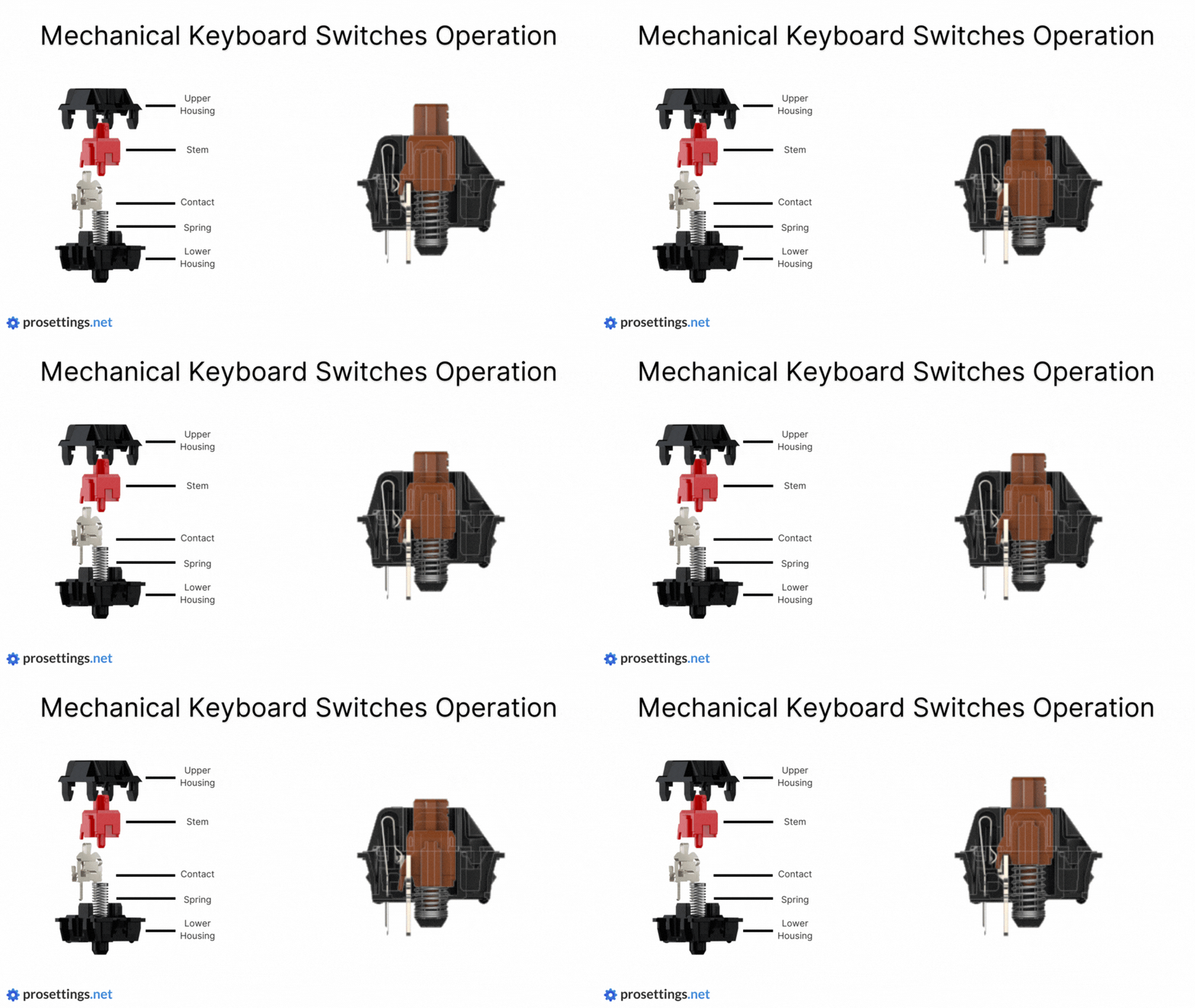
A mechanical switch is the component beneath each keycap that registers a keypress. Unlike membrane keyboards (which feel like typing on soggy toast), mechanical switches use independent springs and stems to give you satisfying, tactile, and consistent keystrokes. They’re the reason why people get addicted to the “thock” or “clack” of a great keyboard.
Each switch consists of:
- Stem: The moving part that defines feel, wobble, and compatibility with keycaps.
- Spring: Determines the resistance and how fast the switch bounces back.
- Housing: Encases and holds the stem and spring together.
- Contacts or Sensors: Where the magic happens—registers the keystroke either through metal contacts, light (optical), or magnets (Hall-effect).
Understanding these basics helps you decode why two switches that look similar might feel wildly different. It’s also what separates a mediocre typing experience from a buttery-smooth one.
Meet the Big Three: Linear, Tactile, and Clicky

Mechanical switches fall broadly into three categories based on how they feel and sound.
1. Linear Switches
- Smooth keystroke with no tactile bump or audible click.
- Preferred by gamers and fast typists who want minimal resistance.
- Examples: Cherry MX Red, Gateron Yellow, Kailh Cream.
Linear switches feel like pressing a piston. You push down and the key goes all the way through without interruption. That makes them incredibly fast but also prone to accidental presses if you’re heavy-handed.
2. Tactile Switches
- Small bump mid-press for tactile feedback, no click.
- Ideal for general use, typing, and coding.
- Examples: Cherry MX Brown, Durock T1, Zealios V2.
That little bump gives you a subconscious signal: “Hey, the keystroke was registered.” This makes them great for productivity. They’re the middle ground between stealthy linears and loud clickies.
3. Clicky Switches
- Pronounced bump and audible click at actuation.
- Loved by old-school typists, hated by roommates and coworkers.
- Examples: Cherry MX Blue, Kailh BOX Jade, Razer Green.
These switches give you tactile and auditory feedback in one package. They can be incredibly satisfying, but they’re best reserved for private setups unless you want noise complaints.
Pro Tip: Not all clickies are created equal. Some are high-pitched and sharp, others are deep and chunky. Always listen to sound tests or try switch testers.
Newer Tech: Beyond the Classics
Modern switch designs are pushing the boundaries of speed, silence, and even analog input. Here are the newer variations gaining popularity:
• Silent Switches
- Have internal dampeners to mute bottom-out and return sounds.
- Great for shared spaces or nighttime work.
- Popular examples: Cherry Silent Red, Gazzew U4 Silent.
• Speed Switches
- Shorter actuation distance (often 1.0–1.2mm).
- Designed for lightning-fast keypresses in games.
- Examples: Cherry MX Speed Silver, Kailh Speed Copper.
• Optical Switches
- Actuate using a beam of light instead of metal contact points.
- Technically faster and more durable due to no debounce.
- Examples: Gateron Optical, Razer Optical Purple.
• Hall-Effect Switches
- Use magnetic fields and sensors for analog-style input.
- Can detect how far you’ve pressed a key, not just whether it’s on/off.
- Examples: Wooting Lekker, Keychron Lemokey.
These are cutting-edge, and some even allow adjustable actuation points and per-key analog control. Think of them as the Tesla of switches.
The Color Chart: Quick Brand-by-Brand Overview
Here’s a simplified color reference across popular brands. Remember: colors are not standardized across manufacturers.
| Brand | Linear | Tactile | Clicky | Silent | Speed |
|---|---|---|---|---|---|
| Cherry | Red, Black | Brown, Clear | Blue, Green | Silent Red | Speed Silver |
| Gateron | Yellow, Red | Brown, Baby Kangaroo | Blue | Silent Red | Speed Silver |
| Kailh | Cream, Red | Brown, Box Brown | Box White | Box Silent Red | Speed Silver |
| Razer | Yellow | Orange | Green | Silent Yellow | N/A |
| Logitech | GX Red, GX Linear | GX Brown | GX Blue | N/A | N/A |
This table is a great starting point but don’t let it replace actually testing the switches. The same “Brown” switch can feel drastically different depending on brand.
How to Pick the Right Switch (Without Regret)
Let’s ditch the guesswork. Here’s a cheat sheet for finding your ideal switch:
| User Type | Best Fit | Why It Works |
|---|---|---|
| Gamer | Linear (Red/Yellow) or Speed | Smooth & fast response |
| Office User | Silent Linear or Silent Tactile | Keeps coworkers happy |
| Typist | Tactile (Brown/Clear/U4T) | Feedback helps avoid errors |
| Hybrid | Medium tactile (Zealios, T1s) | Balance of comfort and control |
Also consider:
- Actuation force: Light switches may be tiring for heavy typists and vice versa.
- Key travel: If you bottom out hard, maybe avoid short-travel speed switches.
Try Before You Buy
Before investing in a full set of switches, try these:
- Switch Testers: Great for comparing feel/sound in-hand.
- Hot-Swap Keyboards: Let you test multiple switches on one board. Huge plus for beginners.
- Meetups and Keyboard Events: Friendly folks, rare switches to try, and a goldmine for ideas.
Modding for Feel & Sound
You don’t need to be a soldering wizard to make your switches feel amazing.
Lubing
- Apply a thin coat of lube to reduce scratchiness.
- Use a brush or switch lubing station.
- Linear switches benefit the most; clicky switches… not so much.
Filming
- Adds a thin layer between top and bottom housing.
- Tightens the switch, reducing wobble and deepening sound.
Spring Swapping
- Use heavier or lighter springs to suit your style.
- Popular mod for those seeking more resistance or faster rebound.
These mods are inexpensive and can dramatically improve your typing experience.
FAQs & Myths
Q: Are all Reds the same?
A: Not at all. Cherry MX Red is the OG, but Gateron Red is smoother, and Kailh Red has its own sound.
Q: Are clicky switches better for typing?
A: Not necessarily. Some typists prefer quiet tactiles. It’s personal preference, not performance.
Q: Is lubing worth it?
A: Yes, especially for linears and tactiles. Just don’t overlube.
Q: Can you switch switches without soldering?
A: Yes, with hot-swappable PCBs, you can just pull and pop.
Q: Are Optical or Hall-Effect switches gimmicks?
A: They’re legit and growing. Optical is great for durability; Hall-effect opens up analog input.